When setting up your home office, one of the most crucial decisions you'll make is choosing the right office chair. A good office chair not only enhances your comfort but also plays a vital role in your overall productivity. With so many options available, it can be overwhelming to find the perfect fit for your needs.
First and foremost, look for a chair that offers adjustable features. This includes height, armrests, and lumbar support. Being able to customize these elements ensures that your chair can align with your body’s natural posture. Ideally, your feet should be flat on the ground, your knees should be at a 90-degree angle, and your lower back should be supported. This ergonomic setup helps to reduce strain during long hours of work.
Another key aspect to consider is the material of the chair. Breathable fabrics can help keep you cool, especially if you’re prone to getting warm while sitting for extended periods. Additionally, opting for a seat with enough cushioning can provide the necessary comfort to avoid discomfort or fatigue. Remember that your chair should support you, not create additional aches.
Finally, don’t forget to test the chair if possible. Sit in it for a few minutes to see how it feels. Pay attention to how the chair supports your back, whether the seat feels comfortable, and how easy it is to adjust its settings. It’s worth investing time in finding the right chair, as the right choice can significantly enhance your work-from-home experience.
Optimize Your Desk Setup
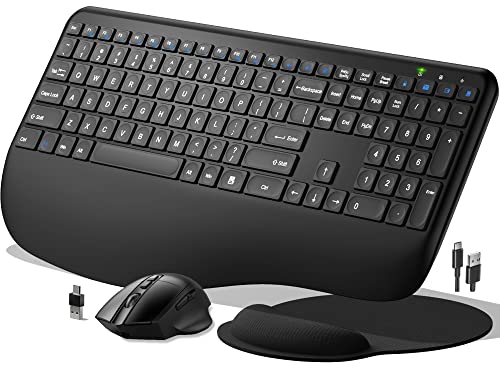
Your desk setup plays a crucial role in creating a comfortable and efficient workspace. Start by selecting a desk that suits your height and allows you to maintain a neutral posture. Ideally, your elbows should be at a 90-degree angle, and your hands should rest comfortably on the keyboard. Consider an adjustable desk that can transition between sitting and standing, giving you the flexibility to change positions throughout the day.
Next, pay attention to your chair. An ergonomic chair is essential for supporting your lower back and promoting good posture. Look for features like adjustable seat height, lumbar support, and armrests. Make sure your feet are flat on the floor or on a footrest. This simple adjustment can help reduce strain on your legs and lower back.
Don’t forget about your monitor! The monitor should be at eye level, about an arm's length away, to avoid straining your neck and eyes. Use a monitor stand or stack books to elevate your screen, ensuring the top of the screen is at or slightly below eye level. If you use a laptop, consider investing in a laptop stand or an external monitor to facilitate a more comfortable viewing position.
Lastly, cable management can help keep your desk tidy and organized. Use cable clips or sleeves to bundle cords and prevent them from tangling or creating clutter. A clean workspace not only looks good but can also enhance your focus and productivity, making it easier to stay on task throughout your workday.
Enhance Lighting for Comfort
Proper lighting is a crucial aspect of creating a comfortable home office environment. Natural light is often the best choice, as it not only brightens up the space but also helps improve mood and productivity. Whenever possible, position your desk near a window to take advantage of sunlight during the day. If relying on daylight isn't feasible, consider using adjustable blinds or sheer curtains to control glare while still allowing some light in.
If natural light isn't an option, investing in high-quality artificial lighting is essential. Opt for lamps that mimic daylight, providing a balanced and soft illumination that reduces eye strain. Look for LED bulbs with a color temperature between 4000K and 5000K, as these can help create a clear and inviting atmosphere. Task lighting, such as desk lamps, can further enhance visibility on your work surface, allowing you to focus on details without discomfort.
Another important aspect of lighting is the arrangement and layering of light sources. By using a combination of ambient, task, and accent lighting, you can create a well-lit and visually appealing workspace. Ambient lighting sets the overall mood, while task lighting provides direct illumination for your work. Accent lighting can be used to highlight decorative elements or artwork, contributing to a more inviting and personalized space.
Don't forget about the importance of reducing harsh shadows and glare in your workspace. Position your lights strategically and avoid overhead fixtures directly above your screen to minimize reflections. Additionally, using anti-glare screens or filters on your monitors can help mitigate eye strain caused by glaring light. By thoughtfully enhancing your office lighting, you can create a more comfortable and functional environment that supports your productivity.
Keep Your Workspace Organized
Keeping your workspace organized is a crucial aspect of maintaining an ergonomic home office. An organized environment not only helps improve your focus but also reduces physical strain. By having your essential tools and equipment within easy reach, you can minimize unnecessary movements that may lead to discomfort or injury over time.
Start by decluttering your desk. Remove any items that you don't use regularly and find a designated space for everything you need. Use desktop organizers to keep pens, notepads, and other small items neatly arranged. This simple step can create a more pleasant and efficient work environment, making it easier to concentrate on your tasks without distractions.
Another important tip is to manage your cords and cables. Tangled wires can not only create a messy appearance but can also pose safety hazards. Use cable ties or clips to keep cords organized and out of the way. This not only helps in maintaining a cleaner look but also ensures that you have more space to work comfortably without the fear of tripping or damaging equipment.
Lastly, invest in some storage solutions such as shelves or filing cabinets. Having dedicated places for documents, books, and other materials keeps your workspace tidy and helps you stay organized. Regularly review and organize these items to ensure your home office remains a conducive environment for productivity and creativity.